Install Simple Host on UpCloud
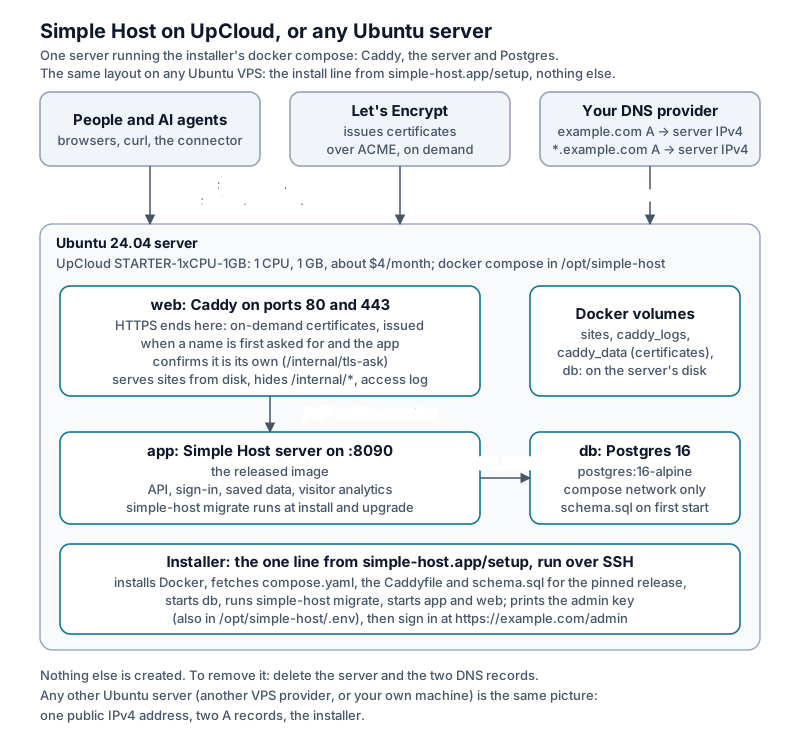
The smallest server (1 CPU, 1 GB, Ubuntu 24.04) runs Simple Host with the standard installer. You can use the same steps on any Ubuntu VPS.
Create your UpCloud account ($25 in credits) (referral link. New accounts through this link get $25 of UpCloud credit; their terms apply.)
Cost
| Item | Size | Per month |
|---|---|---|
Server STARTER-1xCPU-1GB |
1 CPU, 1 GB, storage and one IPv4 address included | about $4 (0.5208 ¢ an hour) |
The database, the web server and the sites all run on that one server, so there is nothing else to pay for. The $25 credit covers about six months.
With your AI agent (recommended)
- Create your UpCloud account.
- In the UpCloud control panel, create an API token (Account → API tokens. It can have an expiry and an IP allow-list) or an API user (a sub-account with API access and only the server permissions it needs).
- Answer the questions at https://simple-host.app/setup?product=small-box, with UpCloud as where it runs.
- On the files step, run the line it gives in your own terminal (it asks for
the token, or the API user’s name and password, without showing it), start
your AI agent in that terminal and give it the prompt. The agent tells you
the plan and its price before creating anything, creates the server with
your SSH key, has you add the DNS records, runs the installer, checks
/healthzand HTTPS, and tells you the admin page. - When the server is up, run
unset UPCLOUD_TOKEN UPCLOUD_USERNAME UPCLOUD_PASSWORDin that terminal, or close it.
The setup page never asks for or accepts UpCloud credentials.
By hand
- In the UpCloud control panel, deploy a server in any zone with plan
STARTER-1xCPU-1GB. Choose Ubuntu Server 24.04 LTS and add your SSH key. - At your DNS provider, add two A records pointing at the server’s public
IPv4 address: your domain, and
*.<your domain>. - Answer the questions at https://simple-host.app/setup?product=small-box with a server I already have, then run the install command it gives on the server over SSH. It fetches the installer from its pinned release and checks its sha256 before running it.
- Open
https://<your domain>/adminand paste the admin key the installer printed (also kept asADMIN_API_KEYin/opt/simple-host/.env).
If anything fails, paste the error at https://simple-host.app/setup?product=small-box#help.
Removing it
Delete the server and its storage in the UpCloud control panel, then remove the two DNS records. Nothing else was created.
Release notes: the changelog.