Install Simple Host on Coolify
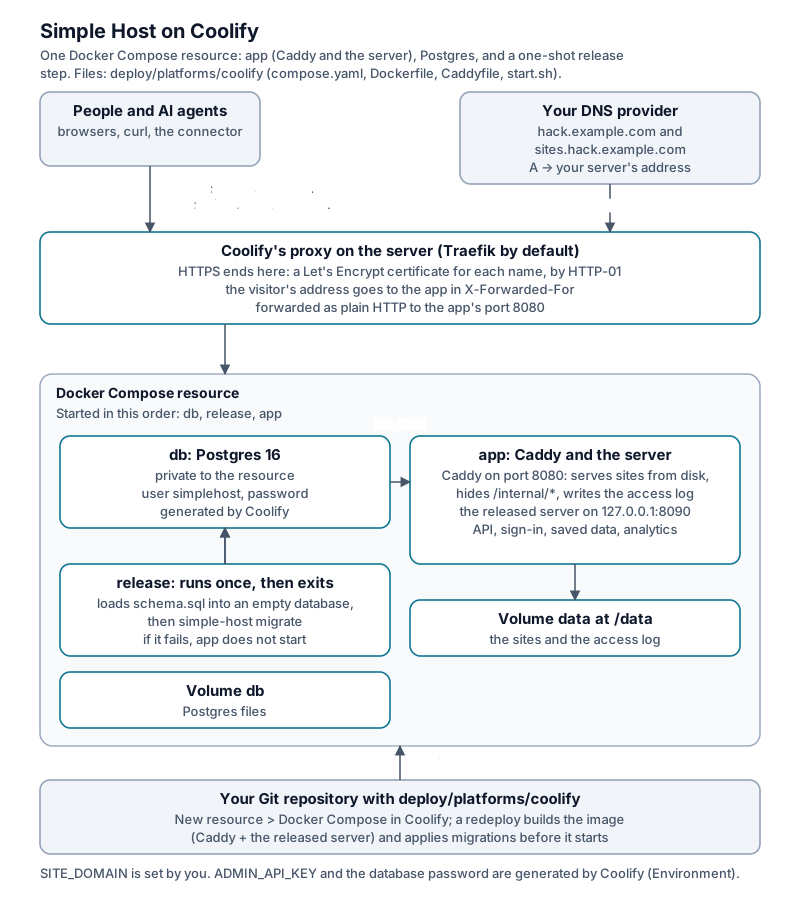
The small box (the installer’s Postgres + server + Caddy) runs on Coolify
as one Docker Compose resource. Coolify’s proxy ends HTTPS for the two names;
inside the resource the app container runs Caddy and the server, Postgres is its
own container, and a one-shot release container loads the schema and applies
every migration before the app starts.
The files are in deploy/platforms/coolify/:
compose.yaml, a Dockerfile that copies the released server into the Caddy
image, a Caddyfile, and start.sh. Nothing is compiled.
Without a Git build: the service template
deploy/platforms/coolify/service-template.yaml
uses only published images (the server, caddy and postgres), so nothing is
built on the server. In Coolify, create a Docker Compose Empty service and
paste it. Coolify generates both addresses (web for the dashboard and API,
sites for published sites), the database password and the admin key
(SERVICE_PASSWORD_64_ADMIN), plus the persistent sealing key
(SERVICE_REALBASE64_32_PASSCODE). Keep that key when editing or upgrading the
resource. Changing it makes stored passcodes and notification secrets unreadable. A page saves data only on a site’s own
address: connect one in the dashboard (the site’s Domain) and add that name
to web’s domains.
What you need
- A server with Coolify installed, its proxy on ports 80 and 443.
- A domain, say
hack.example.com, with twoArecords to the server’s address:hack.example.comandsites.hack.example.com.
Older Git-build recipe
The service template above supersedes this recipe for new installations.
Existing Git-build resources remain supported. Keep their volumes and settings.
This recipe retains its KEEP_VERSIONS=3 default, while the service template
defaults to one.
-
In Coolify, go to Projects > your project > New Resource > Public Repository (or Private). Repository
https://github.com/vineetu/simple-host, branchmain. Build pack Docker Compose, Base Directory/deploy/platforms/coolify, Docker Compose Location/compose.yaml. -
Under Environment Variables, add
SITE_DOMAIN=hack.example.com.ADMIN_API_KEYand the database password are generated for you. -
Under the app service’s Domains, enter both names:
https://hack.example.com,https://sites.hack.example.com -
Deploy. The first build copies the release into the image and takes about a minute. The
releasestep runs first and exits. Then the app starts. -
Open
https://hack.example.com/adminand paste the value ofSERVICE_PASSWORD_ADMIN(Environment Variables). From there, issue participant accounts and hand out their keys, as on any small box.
Everyday operations
- Upgrade: set
SIMPLE_HOST_VERSION(default 0.7.19) to the new release and redeploy.releaseapplies that release’s migrations first. If they fail, the app does not start. Coolify has already stopped the old containers by then, so the site is down until you fix it and redeploy. Your data stays in its volumes. - Settings: the compose file passes the common ones (
MAX_ARCHIVE_MB,KEEP_VERSIONS,MAX_SITES_PER_ACCOUNT, email, Google and OIDC sign-in, notification limits, photo limits, and all fourMCP_APP_*flags). Any setting from configuration.md goes under the app’senvironment:in your own fork’s copy ofcompose.yaml, as a line like the others. Point the resource at your fork instead ofvineetu/simple-host. - Backups: two volumes hold everything,
db(Postgres) anddata(sites and the access log). Back up both, with Coolify’s server backup or your own. “Download my data” and the admin export work as on any small box. - Delete everything: delete the resource and tick the volumes, then remove the two DNS records.
Troubleshooting
- Both names go on the app service. The content routes only answer on
sites.<domain>, and Coolify sends a request only for the names listed. - Behind Cloudflare, set
CLIENT_IP_HEADERtoCF-Connecting-IP. Without it the visitor’s address in the access log and the rate limits is Cloudflare’s. The default,X-Forwarded-For, is what Coolify’s proxy sets when visitors reach it directly. Let only Cloudflare reach ports 80 and 443 (the server’s firewall), or anyone can send that header themselves. - One instance. The sites live on one volume, so do not scale the app past one container.
- The build reaches GitHub for the release’s
schema.sql(the image is built on your server, not pulled).
The schema snapshot in the service template includes zh-site-notifications.sql
and zi-site-search-summary.sql. Its immutable commit and checksum move together.
Release image pins remain unchanged until release cutting. After upgrading to a
release containing summaries, run simple-host site-summary-backfill in the app
terminal after migration. It only updates sites without summaries.
The Apps flags default off. Dashboard also needs My sites, and preview still
requires a client and site headers that permit framing.
Release notes: the changelog.