Install Simple Host on Render
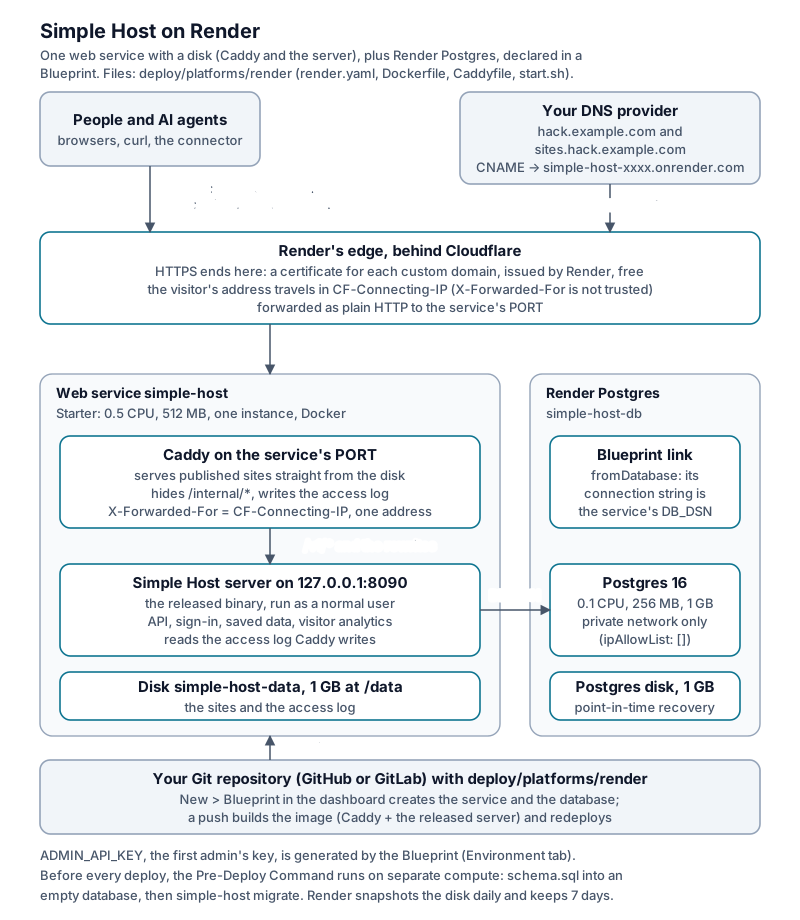
The small box (the installer’s Postgres + server + Caddy) runs on Render as one web service with a disk, plus a Render Postgres database.
The files are in deploy/platforms/render/:
render.yaml (a Blueprint), a Dockerfile that copies the released server
into the Caddy image, a Caddyfile (the small box’s, without its TLS parts),
and start.sh. Nothing is compiled. No change to the server is needed.
What it looks like
| Piece | On a VPS (installer) | On Render |
|---|---|---|
| HTTPS | Caddy, on-demand certificates | Render’s edge: a custom domain for each name |
Sites served from disk, /internal/* hidden, access log |
Caddy container | Caddy in the same service as the server, on Render’s port (10000) |
| Server | app container |
same service, as a normal user, on 127.0.0.1:8090 |
| Database | db container |
Render Postgres, linked as DB_DSN (private network only) |
| Sites on disk | Docker volume | 1 GB Render disk at /data |
| Schema and migrations | the installer runs simple-host migrate |
the Pre-Deploy Command loads schema.sql into an empty database, then runs simple-host migrate, before every deploy |
What you need
Start with a 512 MB web service and a persistent disk. The costs below are estimates.
| Item | Size | Per month |
|---|---|---|
| Web service | Starter (0.5c-512mb), the smallest plan that takes a disk |
$7 |
| Disk | 1 GB, $0.25/GB | $0.25 |
| Postgres | 0.1c-256mb |
$6 |
| Postgres storage | 1 GB, $0.30/GB | $0.30 |
| Custom domains and certificates | free | |
| Workspace | Hobby | $0 |
| Total | about $13.55 |
A free web service has no disk, so published sites disappear after a deploy, a restart, or the sleep that follows 15 minutes without traffic. Free services also have no Pre-Deploy Command, and a free Postgres expires after 30 days.
Install
You need a Render account with a card and a domain. Fork Simple Host on
GitHub or GitLab, or copy deploy/platforms/render/ into your repository.
Set SIMPLE_HOST_VERSION in the Dockerfile (this guide uses 0.7.12). Below,
the address is hack.example.com, with participant sites on
sites.hack.example.com.
-
Edit
deploy/platforms/render/render.yaml: set the three hostnames (SITE_DOMAIN,CONTENT_HOST,PUBLIC_BASE_URL) and the two names underdomains. Changeregion(both places) if Oregon is far from you. Commit and push. -
In the Render dashboard, choose New > Blueprint, pick the repository, and set Blueprint Path to
deploy/platforms/render/render.yaml. Render creates the database, then builds the image and deploys the service. The Pre-Deploy Command loads the schema and applies every migration (empty database: loading schema.sql,applied 28 migration(s)) before the service starts. -
Point both names at the service. Its address is on the service’s page (
simple-host-xxxx.onrender.com).hack.example.com CNAME simple-host-xxxx.onrender.com sites.hack.example.com CNAME simple-host-xxxx.onrender.comRender verifies each name and issues its certificate. An apex name,
example.com, takes an A record instead. The service’s Settings page shows it. -
Sign in: the admin key is the service’s
ADMIN_API_KEY(Environment tab, generated by the Blueprint). Openhttps://hack.example.com/adminand paste it. From there, issue participant accounts (“Issue participant accounts”) and hand out their keys, as on any small box.
Everyday operations
- Upgrade: set the new
SIMPLE_HOST_VERSIONin theDockerfileand push. The Pre-Deploy Command runs the new release’s migrations first. If they fail, the deploy stops and the old version keeps running. A redeploy with nothing new logsdatabase is up to date; nothing to apply. With a disk there is no zero-downtime deploy: the old instance stops before the new one starts. Sites can answer 502 during the deploy. - Restart: choose Manual Deploy > Restart service on the service page. Sites, saved data and accounts all survive. Expect a short interruption.
- Settings: anything in configuration.md goes in the
service’s Environment tab. Email sign-in codes need
RESEND_API_KEYandMAIL_FROM. Without them participants use the keys the admin issues, which is how a small box runs by default. - Backups: Render snapshots the disk daily and keeps at least 7 days (the disk’s page restores one). Paid Postgres has point-in-time recovery (3 days on Hobby). “Download my data” and the admin export work as on any small box.
- Delete everything: delete the Blueprint’s service and database in the dashboard (deleting the service takes its disk and custom domains with it), then remove the two DNS records.
Troubleshooting
-
A card is required. Without one, Render refuses the disk, the Pre-Deploy Command and paid Postgres (“Payment information is required to complete this request”). Do not try to run it on the free plan: sites vanish.
-
The admin page’s disk figure is the Render disk (973 MB usable on a 1 GB disk). Grow the disk on its page if it fills. It cannot shrink.
-
Health checks use your domain. Once the service has custom domains, Render sends its checks with one of them as the Host, which can be
sites.<domain>. There the content routes answer 404, so the first deploy after adding the domains never went live and failed after 15 minutes. The Caddyfile sends/healthzto the server on every host. -
Visitor addresses. Render’s proxy reaches Caddy over loopback (
::1) and sits behind Cloudflare. The Caddyfile readsCF-Connecting-IP, which Cloudflare sets, and sends that address alone inX-Forwarded-For. This keeps visitor addresses correct for rate limits and analytics. -
Caddy’s file capability. Render will not start a program with file capabilities (
caddy: Operation not permitted), so the Dockerfile removes Caddy’s (it only lets Caddy bind ports below 1024). -
Root and the disk. A new disk belongs to root, and in Render’s containers root cannot signal another user’s processes.
start.shhands/datato the server’s user and then runs everything as that user. -
The release image cannot run alone. It is the server only. Sites are served from disk by Caddy, and Caddy also hides
/internal/*and writes the access log that visitor analytics reads. Pointing Render straight at the server leaves every site a 404 and exposes/internal/*. -
A new database is empty.
simple-host migrateonly adds to an existing schema.start.sh releaseloadsdb/schema.sqlfrom the same release tag first, only when theuserstable is missing. -
CMD, not ENTRYPOINT. The image starts with
CMD, so the Pre-Deploy Command (/usr/local/bin/start.sh release) runs on its own rather than being handed to an entrypoint.
Release notes: the changelog.