Install Simple Host on Railway
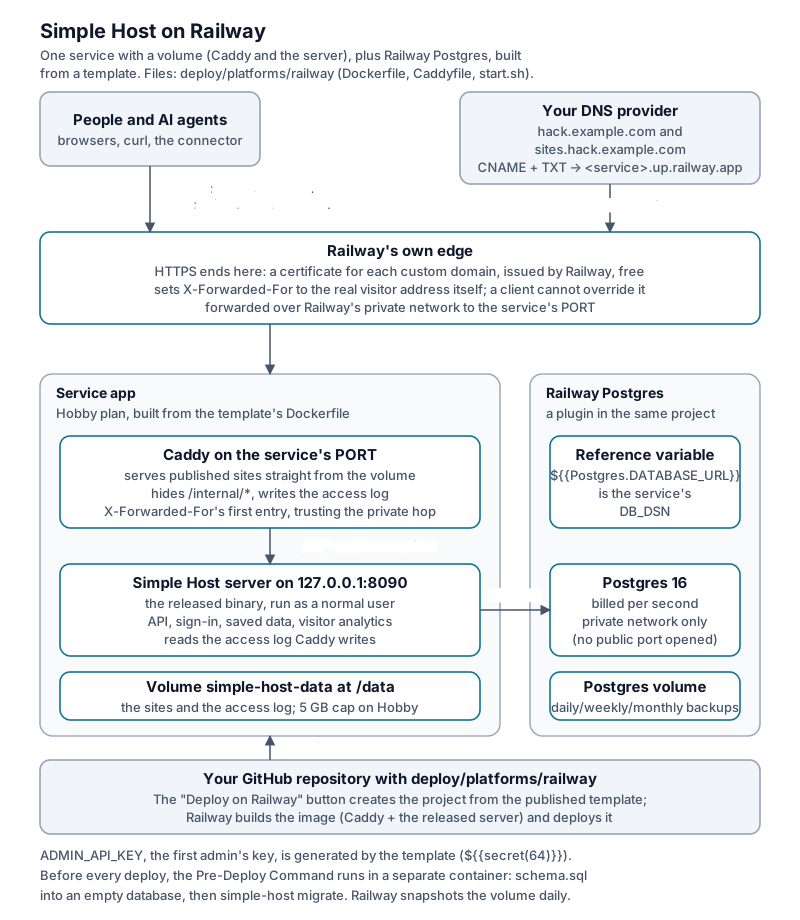
The small box (the installer’s Postgres + server + Caddy) runs on Railway as one service with a volume, plus a Railway Postgres database, both in one project. Railway’s edge ends HTTPS for both names itself (no separate CDN in front, unlike Render’s Cloudflare). Inside the service Caddy and the server share one container, same as the Fly, Render and older Coolify recipes.
The files are in deploy/platforms/railway/:
a Dockerfile that copies the released server into the Caddy image, a Caddyfile
(the small box’s, without its TLS parts), and start.sh. Nothing is compiled. No
change to the server is needed.
Unlike Render or Coolify: there is no file to import
Render reads render.yaml. Coolify’s service template is a compose.yaml you paste in.
Railway has no equivalent committed file. A Railway template is a project configured
once in the dashboard (or railway templates create), then published, which is what
produces the railway.com/deploy/<slug> link a “Deploy on Railway” button points at.
Until that publishing step has happened once, there
is no slug and no working one-click link, so none is shown here: a button that looks
clickable but does not deploy anything is worse than no button. Build the project by hand
with the commands below; deploy/platforms/railway/README.md is the reproducible list of
every setting used, so the result is exactly what the button will deploy once published,
and the project can be rebuilt or audited without Railway’s UI being the only record of it.
What it looks like
| Piece | On a VPS (installer) | On Railway |
|---|---|---|
| HTTPS | Caddy, on-demand certificates | Railway’s edge: a certificate for each custom domain |
Sites served from disk, /internal/* hidden, access log |
Caddy container | Caddy in the same service as the server, on the service’s PORT |
| Server | app container |
same service, as a normal user, on 127.0.0.1:8090 |
| Database | db container |
Railway Postgres, referenced as ${{Postgres.DATABASE_URL}} |
| Sites on disk | Docker volume | a Railway volume mounted at /data |
| Schema and migrations | the installer runs simple-host migrate |
the Pre-Deploy Command loads schema.sql into an empty database, then runs simple-host migrate, before every deploy |
| Generated secrets | you run openssl rand -hex 32 |
${{secret(64)}} in the template, except PASSCODE_ENC_KEY (see Troubleshooting) |
What you need
Railway bills per second. The costs below are estimates. Check the provider’s pricing before choosing a plan.
| Item | Plan | Included | Per month if you stay on it |
|---|---|---|---|
| Workspace | Hobby | $5/month, includes $5 of usage | $5 |
| Compute overage | - | - | ≈$10/GB-month memory, ≈$20/vCPU-month, both metered to the second past the included $5 |
| Volume (sites + access log) | Hobby | up to 5 GB | ≈$0.15/GB-month past the included $5 |
| Postgres | same project | shares the $5 credit | counted the same way, as its own service |
| Custom domains | Hobby: 2 per service | free | free |
A card is required even for the $5 trial credit (Railway has required one since 2023). Running one small instance (app + Postgres) continuously for 30 days typically draws more than $5 of the metered compute and storage above, so budget roughly $5 (plan) plus a few dollars of overage, in the same range as Fly.io (about $4.50/month) or the DigitalOcean droplet (about $6/month), and cheaper than Render (about $13.55/month, which has separate paid minimums for its disk and Postgres tiers). Pro ($20/month, included credit $20) removes the 5 GB volume cap (up to 1 TB) and raises the custom-domain limit to 20 per service.
Install
You need a Railway account with a card and a domain. Fork Simple Host on
GitHub, or copy deploy/platforms/railway/ into your own repository. Below, the address is hack.example.com, with participant sites on
sites.hack.example.com. deploy/platforms/railway/README.md has the same steps as a
reference table. This is the walkthrough.
-
New Project in the Railway dashboard, then Deploy from GitHub repo, your fork. In the new service’s Settings, set Root Directory to
deploy/platforms/railway. Railway finds theDockerfilethere on its own. You can leave the build command empty. -
+ New → Database → PostgreSQL in the same project.
-
In the app service’s Variables tab, add:
DB_DSN=${{Postgres.DATABASE_URL}}?sslmode=disable
ADMIN_API_KEY=${{secret(64)}}
SITE_DOMAIN=hack.example.com
Leave
CONTENT_HOSTunset.start.shdefaults it tosites.$SITE_DOMAIN. -
In Settings → Deploy, set Healthcheck Path
/healthz, Pre-Deploy Command/usr/local/bin/start.sh release. -
In Settings → Volumes, attach a volume at mount path
/data. -
Deploy. The first build copies the release into the image. The Pre-Deploy Command runs first, in its own container (
empty database: loading schema.sql, thensimple-host migrate). Only once it succeeds does the new deployment go live. -
In Settings → Networking, add both custom domains to the app service:
hack.example.com
sites.hack.example.com
Railway shows a CNAME and a TXT record for each. Add both at your DNS provider:
hack.example.com        CNAME  <value Railway shows>
sites.hack.example.com  CNAME  <value Railway shows>
Railway verifies each name and issues its certificate once the CNAME resolves.
-
Sign in: the admin key is the value you generated for
ADMIN_API_KEY(Variables tab). Openhttps://hack.example.com/adminand paste it. From there, issue participant accounts and hand out their keys, as on any small box.
Everyday operations
- Upgrade: change
SIMPLE_HOST_VERSION(the Dockerfile’sARG, default 0.7.21) in your fork and push. The Pre-Deploy Command runs the new release’s migrations first. If they fail, the deploy stops and the old version keeps running. A redeploy with nothing new logsdatabase is up to date. Nothing to apply. - Restart: the service’s Restart action in the dashboard. Sites, saved data and accounts all survive.
- Settings: anything in configuration.md goes in the app service’s Variables tab, exactly as named there.
- Backups: Railway’s volume backups are native and incremental (Settings → Backups): daily (kept 6 days), weekly (kept 27 days), monthly (kept 89 days). Postgres gets the same volume backups, plus its own point-in-time tools. “Download my data” and the admin export work as on any small box.
- Delete everything: delete the project (this removes the service, the volume and the database together), then remove the two DNS records.
Troubleshooting
-
Check
DB_DSN’s resolved value before deploying. The Variables tab previews${{Postgres.DATABASE_URL}}?sslmode=disable. IfDATABASE_URLalready has a query string, append&sslmode=disableinstead. -
Visitor addresses. Railway’s edge replaces client-supplied
X-Forwarded-ForandX-Real-IP. The Caddyfile trusts100.64.0.0/10and readsX-Real-IPfor rate limits and analytics. -
A card is required, even for the trial credit.
-
No committed template file. Unlike
render.yamlor Coolify’scompose.yaml, nothing here is “pasted into” Railway. The dashboard project built from the steps above, once published, is the template;deploy/platforms/railway/README.mdis what lets it be rebuilt from scratch if the published copy is ever lost or needs a fix. -
PASSCODE_ENC_KEYis not auto-generated. It must be exactly 32 random bytes in standard base64 (openssl rand -base64 32). Railway’s templatesecret()function generates a random string of a length from an alphabet, which cannot be made to reliably produce that exact byte-aligned, padded format. Rather than generate a key that looks generated but might not decode, this template leaves it unset: site passcodes stay off until you add the variable by hand. That is a real limit of this template, not an oversight. the feature works fully once you set the key, or is not offered at all. -
Canonical per-person and per-site subdomains are not offered.
PERSON_HOSTSandSITE_HOSTSstay at their installer default (off, path-style addresses:sites.hack.example.com/<handle>/<site>/). Turning them tocanonicalwould need an unbounded number of arbitrary subdomains two levels deep (<site>.<handle>.hack.example.com) provisioned on the fly. Railway’s wildcard custom domains cover one fixed subdomain level (*.sites.example.com), not an arbitrary second level created per account, and Railway’s edge always ends TLS itself with no raw TCP/SNI passthrough an app could use to issue its own certificates for that pattern (the trick Simple Hack’s Coolify/Traefik recipe uses). Path-style addresses are not a downgrade of a feature. They are what every other small-box platform guide (Fly, Render, Coolify) also uses by default. -
Simple Hack standalone is not offered on Railway, for the same reason, one level worse: it needs event sites AND team sites nested two wildcard levels deep (
<team>.<event>.hack.example.com), which the same TLS-termination limit rules out entirely. Use the Coolify or DigitalOcean guide for that platform. -
Volumes cap at 5 GB on Hobby.
MAX_ARCHIVE_MBdefaults the same as the installer (100).KEEP_VERSIONSdefaults to 3 here, same deliberate deviation as the Render and Fly recipes. the installer itself defaults to 1 (no rollback). A hackathon-sized box with many large sites may need Pro (volumes up to 1 TB) sooner than on a VPS with its own disk. -
The release image cannot run alone. It is the server only. Sites are served from the volume by Caddy, and Caddy also hides
/internal/*and writes the access log that visitor analytics reads. Pointing Railway straight at the server image leaves every site a 404 and exposes/internal/*. -
A new database is empty.
simple-host migrateadds to an existing schema.start.sh releaseloadsdb/schema.sqlfrom the same release tag first, only when theuserstable is missing. -
CMD, not ENTRYPOINT. The image starts with
CMD, so the Pre-Deploy Command (/usr/local/bin/start.sh release) runs on its own rather than being handed to an entrypoint. -
Root and the volume. A new volume is owned by root, and Railway’s containers, like Render’s, do not let root signal another user’s processes.
start.shhands/datato the server’s user and then runs everything as that user.
Release notes: the changelog.